Native macOS · Local-first · No subscription

You have the sounds.
Now find them.

Your SFX library has grown over years of work. SFXScout makes every file in it searchable, taggable, and previewable in seconds — without cloud accounts, subscriptions, or anything leaving your machine.

Includes SoundMap · 14-day full-featured trial · One-time purchase

SFXScout
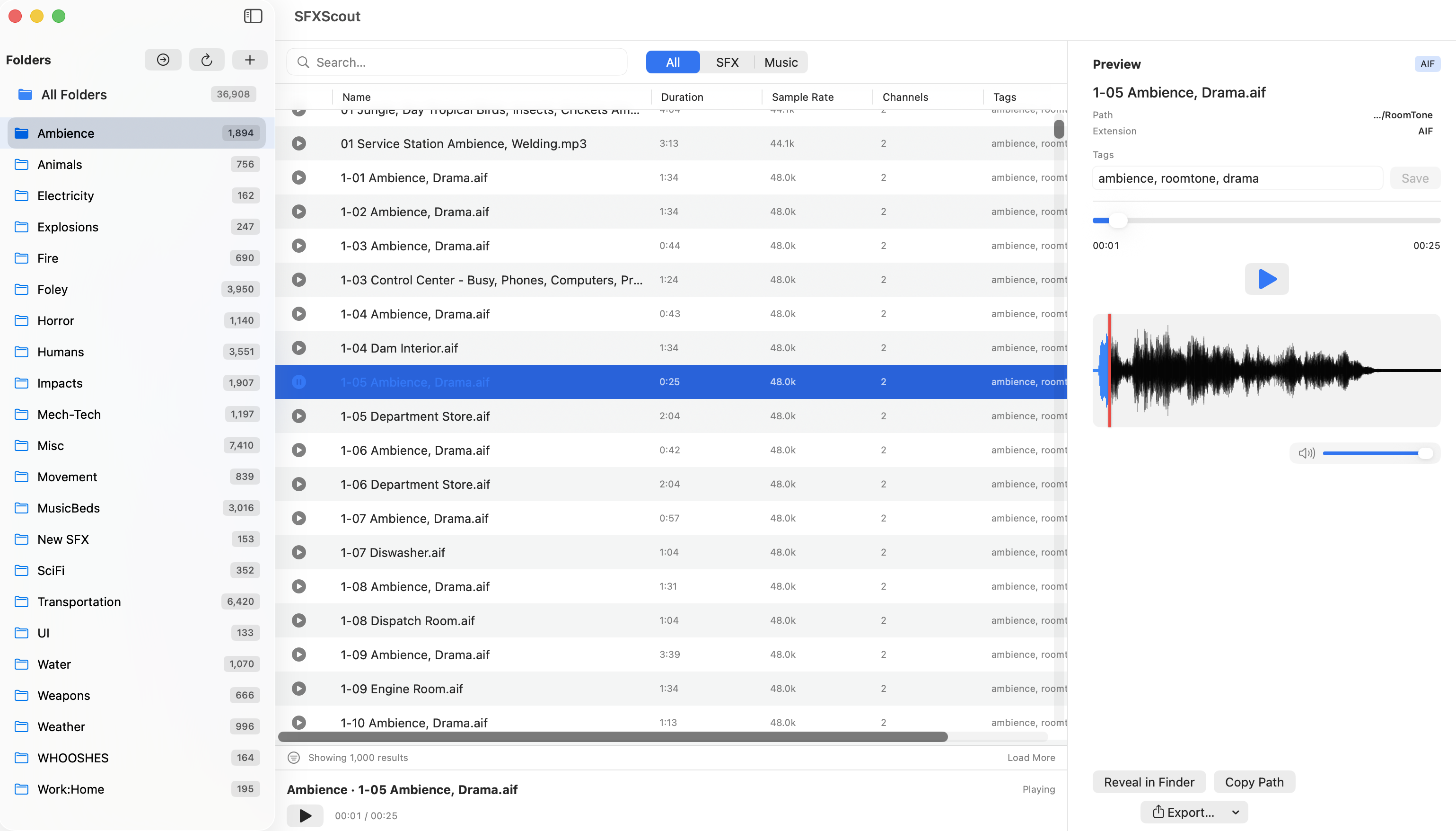
SFXScout — folder browser, file list, and waveform preview
Built by a working professional
One-time purchase — no subscription
Handles 100,000+ file libraries
Your files never leave your Mac

The backstory

Ten minutes to find a sound you know you have.

I'm a working film and television editor. Every session, I'd lose ten minutes hunting for a sound I knew I had somewhere — footsteps on gravel, a specific car backfire, a door creak from a library I'd licensed three jobs ago.

The professional tools cost $899 and require a USB dongle. The free tools weren't built for serious work. There was nothing in between that felt like it belonged on a modern Mac.

I built SFXScout to solve my own problem. My assistant started using it the next week and hasn't stopped. If your sounds are scattered across drives, inconsistently named, and impossible to search — this was made for you.

What it does

Built for how you actually work.

Everything you need to find, preview, and pull sounds fast. Nothing you don't.

Instant full-text search

Type anything. SFXScout searches filenames and AI-generated tags across your entire library as you type — even with 100,000+ files.

On-device AI tagging

Point SFXScout at a folder. It analyses each file and writes tags using a professional sound taxonomy — so a file called thud_01.wav becomes searchable as impact, low-end, body fall. All on-device. Nothing uploaded, ever.

Waveform preview

See and hear before you commit. Full waveform visualisation with playback controls, right in the app. No bouncing to Finder or an external player.

Local-first, always

Your library never leaves your machine. No account required. No cloud sync. No internet connection needed — ever. Your files stay yours.

Pro-grade export

Export as CSV spotting log, M3U playlist, or symlink collection. ALE export for direct Avid bin import. Built for real post workflows.

Native macOS

Built with SwiftUI for Apple Silicon. Feels like it belongs on your Mac, handles massive libraries, and works entirely offline.

The app

Your whole library, right there.

Browse folders, search across everything, preview before you pull — all in one place.

SFXScout
SFXScout app interface

How it compares

The gap in the market.

Soundminer runs $399 and up, and it shows its age. Free tools aren't built for serious work. SFXScout is what was missing.

Tool Price Local-first AI tagging macOS native One-time
SFXScout $69 (with SoundMap)
Soundminer V6 Pro $899
Basehead $149–$299
Soundly Pro $150/yr
AudioFinder $60–$80
SoundMap

Also included

SoundMap — script-driven sound design

Import a screenplay. Generate a layered brief for every scene. Export to PDF, CSV, or a .soundmap project. Included in the $69 price — not a separate purchase.

See SoundMap →

Pricing

One price. Both apps. No subscription.

SFXScout and SoundMap ship together. Pay once, use them forever.

SFXScout + SoundMap

Search your library and brief your scenes.

$69
one-time · 2 activations
  • SFXScout — full library indexer
  • SoundMap included — AI sound design workspace
  • On-device AI tagging
  • Fountain + PDF script import
  • CSV, M3U, ALE, symlink export
  • Free updates for v1.x
  • Works offline, local-first
  • Email support from the builder
Buy SFXScout — $69 · SoundMap included

Secure checkout via Paddle · Instant download · 14-day refund, no questions

14-day full-featured trial available before you buy. Multi-seat? Get in touch.

Questions

Common questions.

What do I get for $69?
Both apps: SFXScout (library indexer) and SoundMap (sound design workspace). One purchase, two apps, no subscription. They work independently and together — SoundMap reads your SFXScout library directly, without SFXScout needing to be running.
Is there a free trial?
Yes. Download the full suite and try it for 14 days — every feature, no limits, no credit card required. If it's not for you, delete it. If it is, buy a licence.
Does SFXScout require an internet connection?
No. SFXScout is fully local. Search, preview, tag, and export all run on your Mac. Nothing leaves your machine.
What audio formats are supported?
SFXScout reads WAV, AIFF, AIF, MP3, M4A, FLAC, CAF, and OGG. Export is available as CSV spotting log, M3U playlist, symlink collection, and ALE (Avid Log Exchange) for direct Avid bin import.
How does AI tagging work?
SFXScout ships with a companion tool called sfx-tagger. It analyses filenames and audio content using an on-device model (Apple's SoundAnalysis framework), and writes tags using a professional post-production taxonomy — all locally. No audio is sent anywhere.
How large a library can it handle?
SFXScout uses a SQLite database with FTS5 full-text indexing and paginated results. It's been tested with libraries over 100,000 files with no UI slowdown. Honest note: if your library is under ~2,000 files, you probably don't need this yet.
What macOS version do I need?
SFXScout requires macOS 13 Ventura or later, and is optimised for Apple Silicon (M1/M2/M3/M4). SoundMap runs on the same minimum.
Can I use it across multiple machines?
Yes. One licence includes 2 activations — home and work Mac, for example. If you need more seats for a team, get in touch.
Is SoundMap also native macOS?
SoundMap is an Electron app — it's a session workspace you open for a sound pass, not a background process or file-system tool. That's the right architecture for what it does. SFXScout is the native Swift app; SoundMap sits alongside it and reads its library directly.